
TABLE OF CONTENTS
Overview
Plex is integrated into the WiiM Home app, allowing you to access and stream your personal media library in one place.
Plex is a media server that lets you organize and stream your personal collection of music, videos, and photos from your computer, NAS, or cloud storage. It enables playback across multiple devices, including smartphones, smart TVs, and WiiM devices.
To learn more about Plex, visit the official Plex website.
WiiM Devices Supporting Plex
All WiiM devices support Plex, except the WiiM Sub Pro and WiiM Vibelink Amp.
Accessing Your Plex Music Library
Before You Begin
- Ensure your Plex Media Server is set up and running according to the Plex Media Server Setup Guide.
- Ensure your WiiM device is properly set up.
- Ensure the WiiM Home app is updated to the latest version.
- Ensure your WiiM device firmware is updated to the latest version.
- Ensure your WiiM device and mobile phone (running the WiiM Home app) are connected to the same network.
- Ensure the Plex Media Server is reachable by the mobile phone and WiiM device via one of the following methods:
- Method 1: The Plex Media Server is on the same network as the phone and WiiM device.
- Method 2: The Plex Media Server is on a different network with the Relay option enabled in Network Settings.
 Note: When using Method 2, audio quality may be reduced due to bandwidth limitations.
Step-by-Step Guide
- Open WiiM Home app on your mobile device.
- Go to the Browse tab, then select Plex from the Music Services section.
- Follow on-screen instructions to log in with your Plex account credentials.
- Select your music library when prompted.
- Once completed, you'll see the Plex main screen.
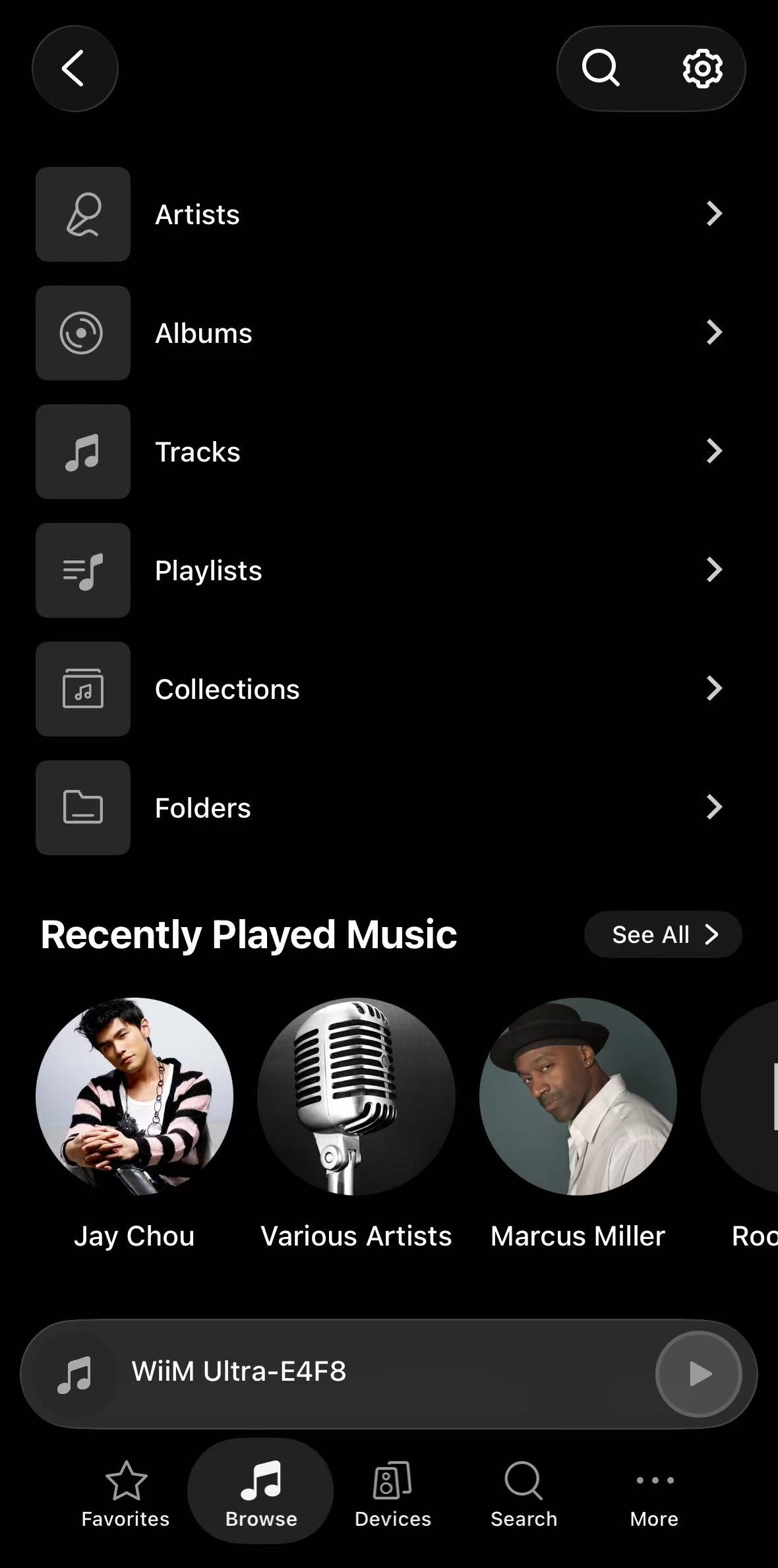
Browsing Your Plex Music Library
Plex offers different ways for you to browse your music library and find your favorite music.
Manual Browsing
Your music library is organized into several categories at the top of the screen. You can browse them manually to find your favorite music.
- Artists:Browse music by artist.Tip: Select an artist to view all related music, such as, Tracks, Albums, Singles & EPs, Soundtracks, Compilations, and more. Some of these sections require a Plex Pass subscription.
- Albums: Browse and view full albums as complete collections.
- Tracks: View all individual songs in the library in a flat list.
- Playlists: Access saved playlists. You can also create or rename a playlist.
- Collections: View grouped content organized by theme or metadata.
- Folders: Browse music based on the original file and folder structure.
Personalized Recommendations
Plex also offers curated content based on your listening behavior and music library updates, helping you continue listening or discover new music without manual browsing.
This section includes:
- Recently Played: Quickly resume music you have listened to before.
- Recently Added: View newly added content in your music library.
- Recent Playlists: Jump back into the playlists you recently listened to.
- Stations: Launch endless, themed radio streams generated from your library, including Library Radio, Deep Cuts Radio, Time Travel Radio, Random Album Radio, Style Radio, Mood Radio, and Decade Radio.Note: Some radio stations are only available with a Plex Pass subscription.
- More / Recommended Content: Explore related music based on your library and listening context.
Instant Search
Plex provides a search function to help you quickly find music within your library.
Tap the search icon  in the top-right corner of the screen, then enter your search term. Results will appear automatically as you type. You can also filter results by selecting a category, such as Albums, Artists, Tracks, or Playlists.

Plex Settings
Tap the  icon in the top-right corner to open Plex Settings.
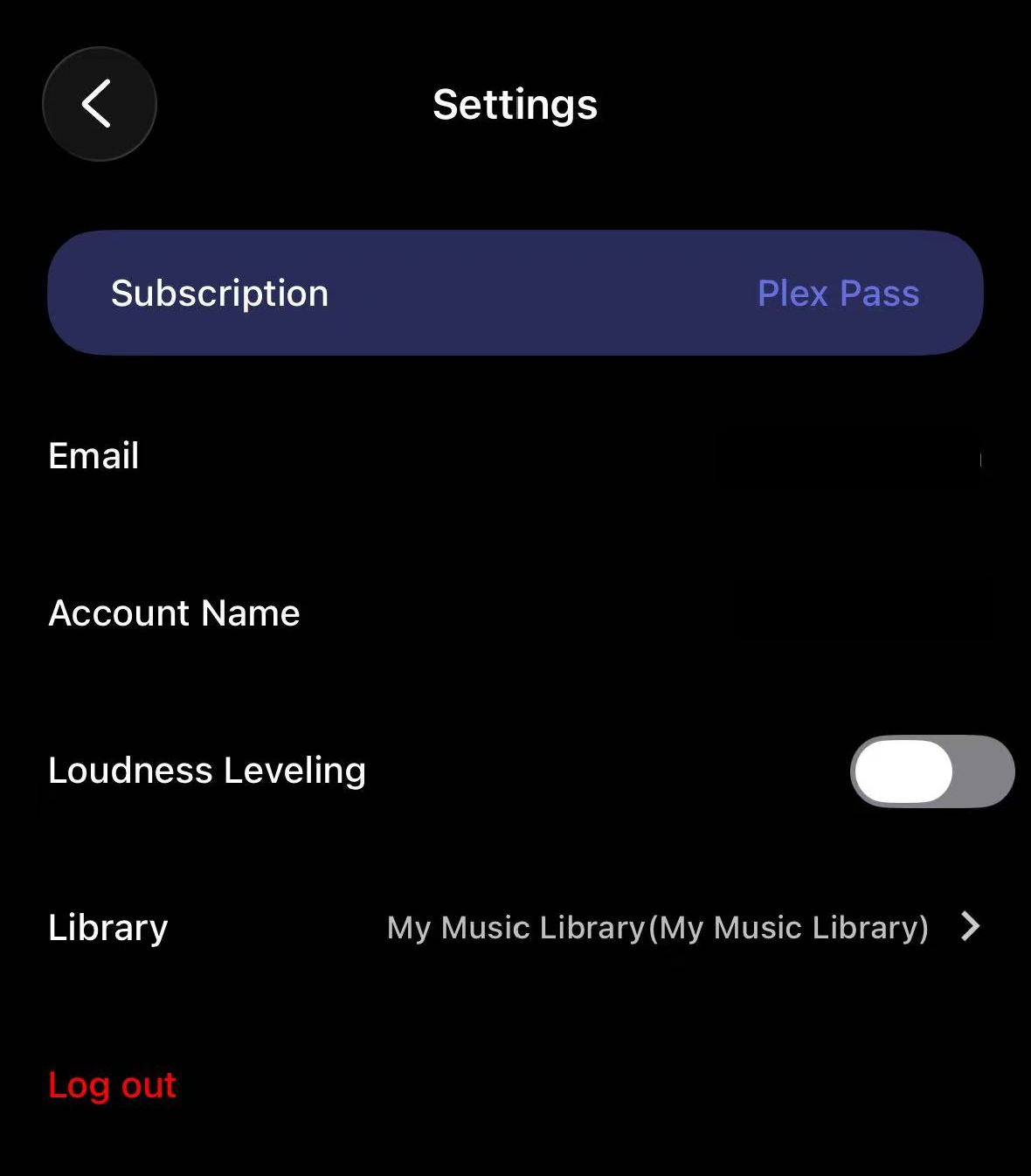
From here, you can view your account information, switch music libraries and configure Loudness Leveling.
Switch Music Library
If you have multiple music libraries, tap Library to re-select music libraries you want to access.
Loudness Leveling
Loudness Leveling normalizes volume differences between tracks for a more consistent listening experience. When enabled, it reduces sudden volume changes between songs.
For details, see How to Use Replay Gain via the WiiM Home App.
Troubleshooting
If you are unable to connect to Plex Media Server, please see Troubleshooting unable to connect to Plex Media Server via WiiM Home app.