
TABLE OF CONTENTS
If your WiiM device appears in the AirPlay list but you cannot connect to it, follow the troubleshooting steps below.
1. Restart Devices
Restart your Wi-Fi router, WiiM device, and Apple device. This can help resolve temporary connection issues.
2. Optimize Wi-Fi Signal and Performance
- Ensure the WiiM device is placed close to your Wi-Fi router to maintain a strong Wi-Fi signal. Weak signals can cause connection failures.
- If using a dual-band router, try connecting the WiiM device to the 5 GHz band for better performance. For detailed instructions, see Separating the 5GHz and 2.4GHz bands on your router.
3. Disable Private Wi-Fi Address (for iPhone or iPad)
Go to Settings > Wi-Fi, tap the Info icon next to the connected network, and turn off Private Wi-Fi Address.
4. Adjust Firewall Settings (for Mac)
Go to System Settings (or System Preferences) > Network > Firewall, and ensure it is not set to block incoming connections.
You can also temporarily turn off the firewall to test if it resolves the issue.
5. Renew the DHCP Lease
Unplug your router from power for 30 seconds, then plug it back in. This refreshes the network connection and assigns new IP addresses to connected devices.
6. Check Wi-Fi Router Settings
- Disable AP Isolation / Wi-Fi Isolation: Ensure that AP isolation (or Wi-Fi isolation) is turned off, so devices on the same network can communicate.
- Enable Multicast / IGMP: Ensure that multicast and IGMP (Internet Group Management Protocol) settings are enabled to support proper device discovery and streaming.
- Potential Blocks: Review your router for firewall settings or parental controls that might restrict the WiiM device.
7. Check and Disable VPN
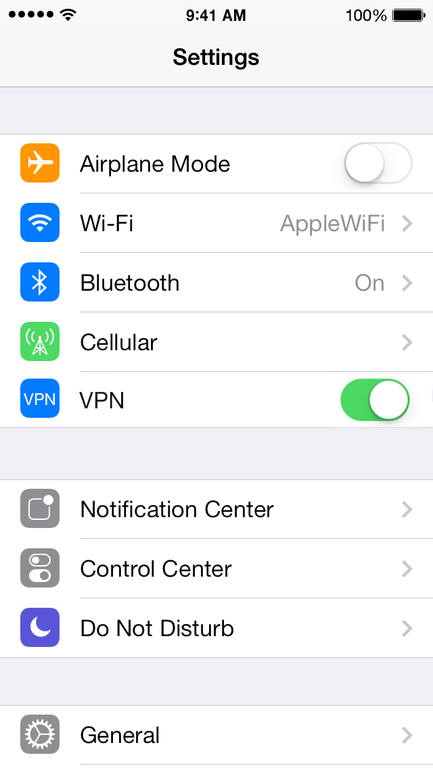
Open Settings on your Apple device and verify if the VPN setting is disabled.
If the VPN setting is enabled as shown in the example below, toggle it off.
8. Update WiiM Firmware
Open the WiiM Home app and check whether a firmware update is available for your WiiM device.
If so, update the firmware and try AirPlay again.
9. Contact WiiM Support
If none of the above steps resolve the issue, please send feedback through the WiiM Home app so our support team can assist you further.