
TABLE OF CONTENTS
If you are trying to stream music from your Apple device via AirPlay and cannot find your WiiM device in the AirPlay list, please follow the troubleshooting steps below.
Troubleshooting Steps
1. Check AirPlay Compatability
Confirm that your WiiM device supports AirPlay.
Currently, only the following WiiM models support AirPlay:
- WiiM Mini
- WiiM Pro
- WiiM Pro Plus
- WiiM Amp
- A10 MKII WiiM Edition
- C10 MKII WiiM Edition
2. Check Network Connection
Ensure both your Apple device and the WiiM device are connected to the same network.
Tip: Open the WiiM Home app on your Apple device.If you can see your WiiM device on the Devices tab, both devices are connected to the same network.3. Try Different AirPlay Methods
There are two AirPlay options on Apple devices. Please try both options as below.
- Option 1: From the Control Center.
- Option 2: From within an app (e.g., Apple Music, Spotify)
Make sure the app you are using is updated to the latest version.4. Check and Disable VPN
Open Settings on your Apple device and verify if the VPN setting is disabled.
If the VPN setting is enabled as shown in the example below, toggle it off.
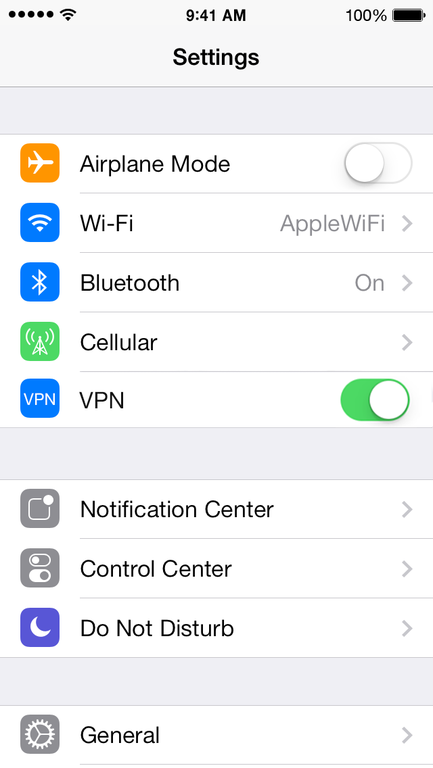
5. Restart Devices
Restart your Wi-Fi router, WiiM device, and Apple device. This can help resolve temporary connection issues.
6. Update WiiM Firmware
Open the WiiM Home app and check whether a firmware update is available for your WiiM device.
If so, update the firmware and try AirPlay again.
7. Test Another Network
Try connecting both your Apple device and WiiM device to a different Wi-Fi network to determine whether the problem is network-related.
8. Contact WiiM Support
If none of the above steps resolve the issue, please send feedback through the WiiM Home app so our support team can assist you further.