
TABLE OF CONTENTS
This tutorial provides practical guidance on using WiiM's RoomFit™ feature to optimize sound quality, based on valuable tips shared in a WiiM forum user's post. These practical tips make it easier and more effective to use RoomFit™ for achieving optimal sound performance.
1. Place Your Speaker and Subwoofer
- Speaker Placement
Place them close to the wall behind. If they have a bass-reflex port, leave about a 5 cm gap. This shifts the primary SBIR cancellation to a higher, less noticeable frequency. - Subwoofer Placement
Position it in a room corner. This increases bass output through boundary reinforcement, giving extra headroom for later room correction fine-tuning.
For the rationale behind these placement choices, please refer to this article.
2. Set Up Your Subwoofer's Crossover Frequency
Set your subwoofer's physical crossover knob to MAX to avoid double filtering.
3. Set Up Your Subwoofer's Level
Set your subwoofer's physical volume knob to the middle position to prevent the sound from being too quiet.
4. Synchronize Speaker and Subwoofer Delays
Proper synchronization ensures bass and higher frequencies arrive at your ears simultaneously, preventing phase issues.
- For WiiM Amp and WiiM Amp Pro: Use the Subwoofer & Speakers Sync function in the WiiM Home app to calibrate relative delays. See Syncing Your Subwoofer with Main Speakers tutorial.
- For WiiM Ultra and WiiM Amp Ultra: Use the Subwoofer Calibration feature in the WiiM Home app to automatically align both the time delay and volume level. See Subwoofer Calibration Guide.
5. Configure the RoomFit™ Settings
Refer to the screenshot or table below for the recommended RoomFit™ settings:
| Recommended RoomFit™ Settings | |
|---|---|
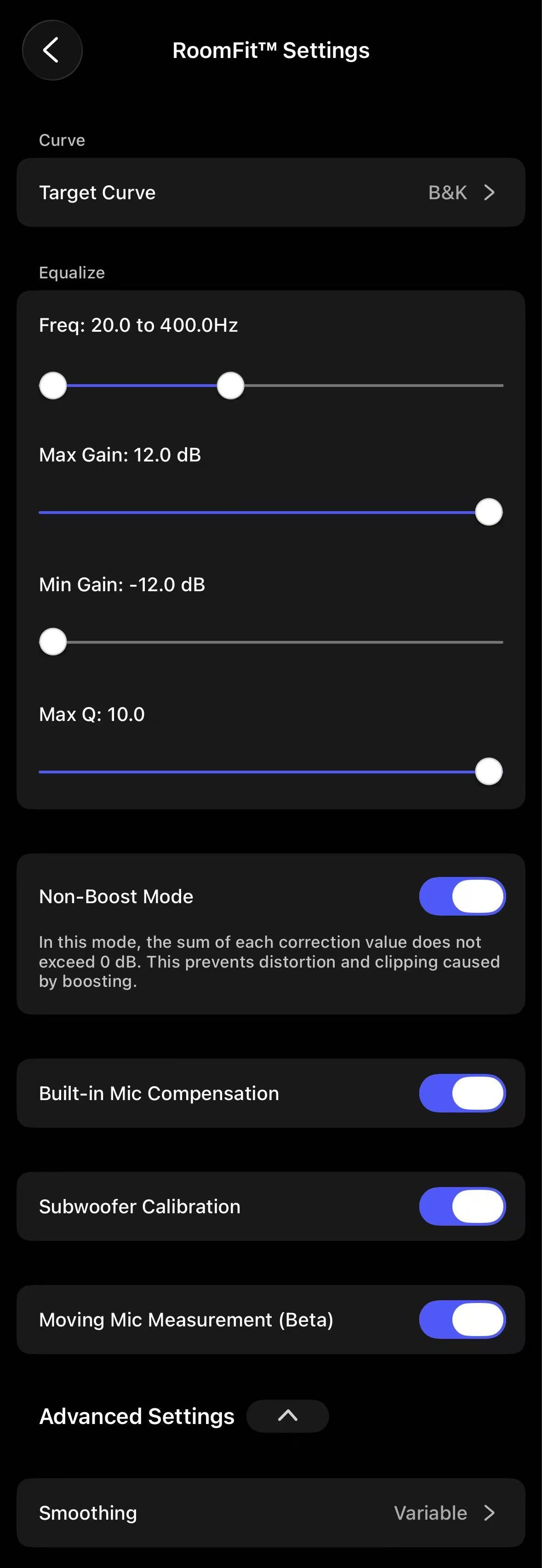 | Target Curve: B&K Freq: 20 Hz to 400 Hz Note: If your subwoofer does not reach 20 Hz, use the lower frequency limit specified in the subwoofer's specification sheet instead. Max Gain: 12 dB Min Gain: -12 dB Max Q:
Non-Boost Mode: Enabled Built-in Mic Compensation: Enabled Subwoofer Calibration: Enabled (if using a subwoofer) Moving Mic Measurement (Beta): Enabled (if spatial averaging is required) Note: This measurement method is more sensitive to environmental noise. Smoothing: Variable Other Settings:
|
6. Perform RoomFit™
Start the RoomFit™ process in the WiiM Home app and follow the on-screen instructions to complete it. For detailed steps, see Optimizing Your Audio Experience: A Comprehensive Guide to RoomFit™ Room Correction.
By following these clear steps and explanations, you can achieve more accurate and effective room correction, resulting in optimal sound performance.