
TABLE OF CONTENTS
Overview
This tutorial will guide you through tuning the subwoofer settings on your WiiM device to enhance your listening experience.
Subwoofer tuning and calibration are important for delivering deep, impactful bass that enhances your overall audio experience. A well-tuned subwoofer blends naturally with your main speakers, creating bass that feels like an extension of the overall sound rather than a separate element. Proper tuning allows the bass to match the acoustics of your room and your listening preferences.
Why Use a Subwoofer
Most main speakers are limited by their cabinet size and driver dimensions, making it difficult for them to accurately reproduce deep bass. Forcing smaller speakers to play ultra-low frequencies at high volumes usually results in audio distortion.
To address this, a subwoofer is introduced. It is a specialized speaker designed exclusively to reproduce low-frequency sound, typically in the range of 20Hz to 120/200Hz. This includes cinematic effects (explosions, thunder) and musical elements (drums, bass).
Adding a subwoofer to your setup provides two key benefits:
- Offloads main speakers for better clarity: By taking over the heavy lifting of bass reproduction, the subwoofer prevents your main speakers from straining. This drastically reduces distortion, allowing them to focus on delivering crystal-clear mid and high frequencies.
- Increases overall system impact: It adds physical, low-frequency energy to your audio, giving you a fuller, richer, and more immersive theater-like experience.
Subwoofer Tuning Instructions
Step 1: Place Your Subwoofer Properly
Because low bass frequencies are non-directional, the human ear cannot easily pinpoint where the sound is coming from. This gives you highly flexible placement options.
For the best performance, try these two primary placement options:
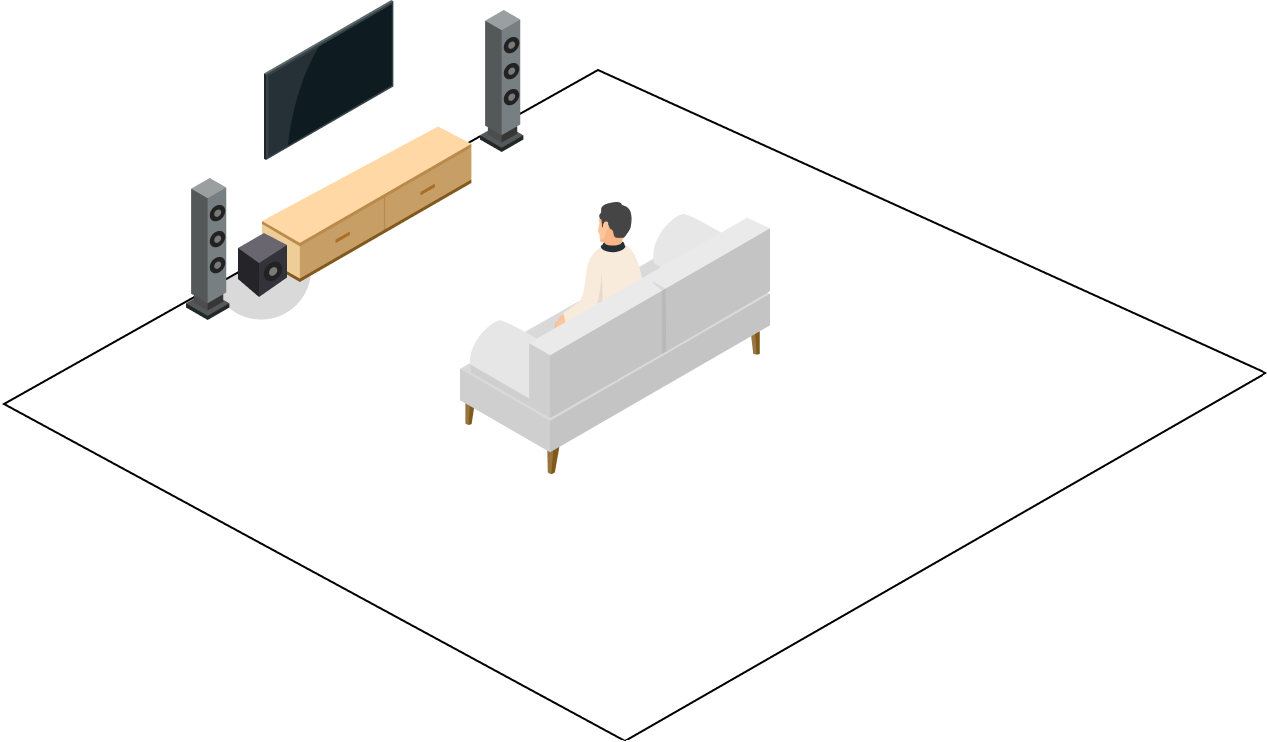
- Start by placing the subwoofer at the front of the room, close to your main speakers. This often provides the most natural and seamless blend with your overall sound.
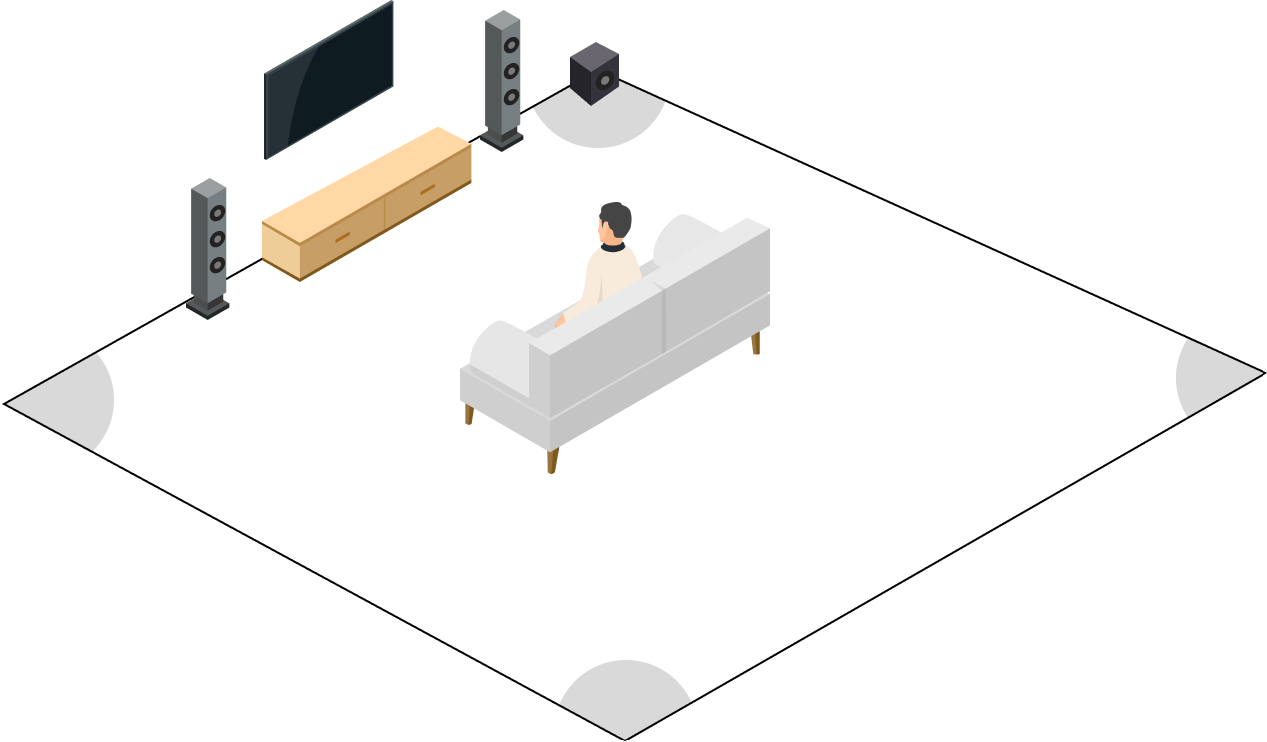
- Alternatively, try placing the subwoofer in a corner. This can increase bass output by reinforcing low frequencies through room reflections. It often delivers fuller bass and helps reduce "dead spots" in the room.
Step 2: Use the LFE Input
Connect your subwoofer to the LFE (Low-Frequency Effects) input.
Step 3: Set Crossover Frequency and Volume on Your Subwoofer
If using a traditional powered subwoofer, set its crossover knob and volume knob as follows:
- Set its physical crossover knob to MAX to avoid double filtering.
- Set its physical volume knob to the middle position to prevent the sound from being too quiet.
Step 4: Adjust Sub Out Settings in the WiiM Home App
Begin by using the default settings, as they are generally optimized for most setups.
Crossover
Set the crossover frequency depending on your speaker type.
| Speaker Type | Recommended Crossover Frequency |
|---|---|
| Very small speakers | 150–200 Hz |
| Satellite speakers | 100–150 Hz |
| Most speakers | 80 Hz |
| Large floorstanding speakers | 0–60 Hz |
Level
If the subwoofer sounds too loud, adjust the subwoofer level within the WiiM Home app. This is more convenient than adjusting the subwoofer directly.
Phase
Test the phase switch.
- Try the phase switch at both 0° and 180°.
- Keep the setting that produces louder bass.
- After setting the phase, re-adjust the subwoofer level if needed.
Step 5: Sync Subwoofer and Speakers
When your WiiM device connects to both speakers and a subwoofer, it assumes equal delay in both audio paths. However, if the speakers or subwoofer applies additional audio processing, this can introduce a slight delay. This timing mismatch may cause high and low frequencies to sound out of sync, impacting overall audio quality.
To ensure a seamless, balanced sound experience, use the Subwoofer & Speaker Sync or Subwoofer Calibration option in the WiiM Home app to simply sync the subwoofer with the speakers.
For detailed instructions, see the articles below:
- Tutorial: Syncing Your Subwoofer with Main Speakers
- Subwoofer Calibration: One-Tap Sync between Main Speakers and Subwoofer
Louder bass usually indicates better sync. Fine-tune the latency until the bass sounds optimal.
Step 6: Perform RoomFit™
Go back to the Device Settings in the WiiM Home app, and then select RoomFit™ to smooth out any remaining frequency response issues. This step helps optimize the overall sound quality.
For detailed instructions, see Optimizing Your Audio Experience: A Comprehensive Guide to RoomFit™ Room Correction.
Step 7: Listening Tests and Fine-Tuning
Play some of your favorite content, including tracks with lots of deep bass.
Listen carefully to ensure the bass blends smoothly with your other speakers and feels balanced within the overall soundstage.
If the bass sounds too soft, try raising the subwoofer level slightly, by around 2–4 dB. Don't raise it too high, as this can cause the bass to overpower the rest of the sound.
FAQ: Common Issues and Solutions
Q1: Why does my subwoofer sound weak or quiet?
Potential causes:
- The subwoofer level is set too low.
- The crossover frequency is incorrectly configured.
- The subwoofer is not positioned properly in the room.
Solutions:
- Turn up the subwoofer volume.
- Set the crossover setting to the 80 Hz.
- Move the subwoofer closer to a wall or corner to naturally boost its output.
Q2: Why does the bass sound thin or lack punch?
Potential causes: A phase mismatch exists between your subwoofer and the main speakers.
Solutions:
- Flip the phase from 0° to 180° (or vice versa) to see which setting sounds fuller.
- Re-run the RoomFit™, and sync the main speakers and subwoofer again.
Q3: Why does the bass sound boomy?
Potential causes:
- The subwoofer is placed too close to a corner, causing excessive reflections.
- Natural room resonance is amplifying specific low frequencies uncontrollably.
Solutions:
- Move the subwoofer a few inches away from walls and corners to give it breathing room.
- Slightly turn down the subwoofer volume.
Q4: Why does the bass feel out of sync or delayed?
Potential causes: There is a physical distance or timing mismatch between the subwoofer and the main speakers.
Solutions: Sync the main speakers and subwoofer again.