
TABLE OF CONTENTS
Overview
The WiiM Ultra now supports Auto Headroom, a feature that helps prevent audio clipping, ensuring your music always stays clean and crisp.
What Is Headroom?
In digital audio, headroom is the safety buffer between your audio signal's highest peak and the system's maximum volume limit.
If an audio signal exceeds this limit, the system cuts off the extra signal level, causing digital clipping and audible distortion. Headroom ensures there is always enough space for loud peaks and boosted frequencies to play cleanly.
Why Headroom Is Needed
EQ and RoomFit™ can boost parts of the audio signal. If the boosted signal exceeds the maximum digital level, clipping may occur and cause audible distortion.
How Auto Headroom Works
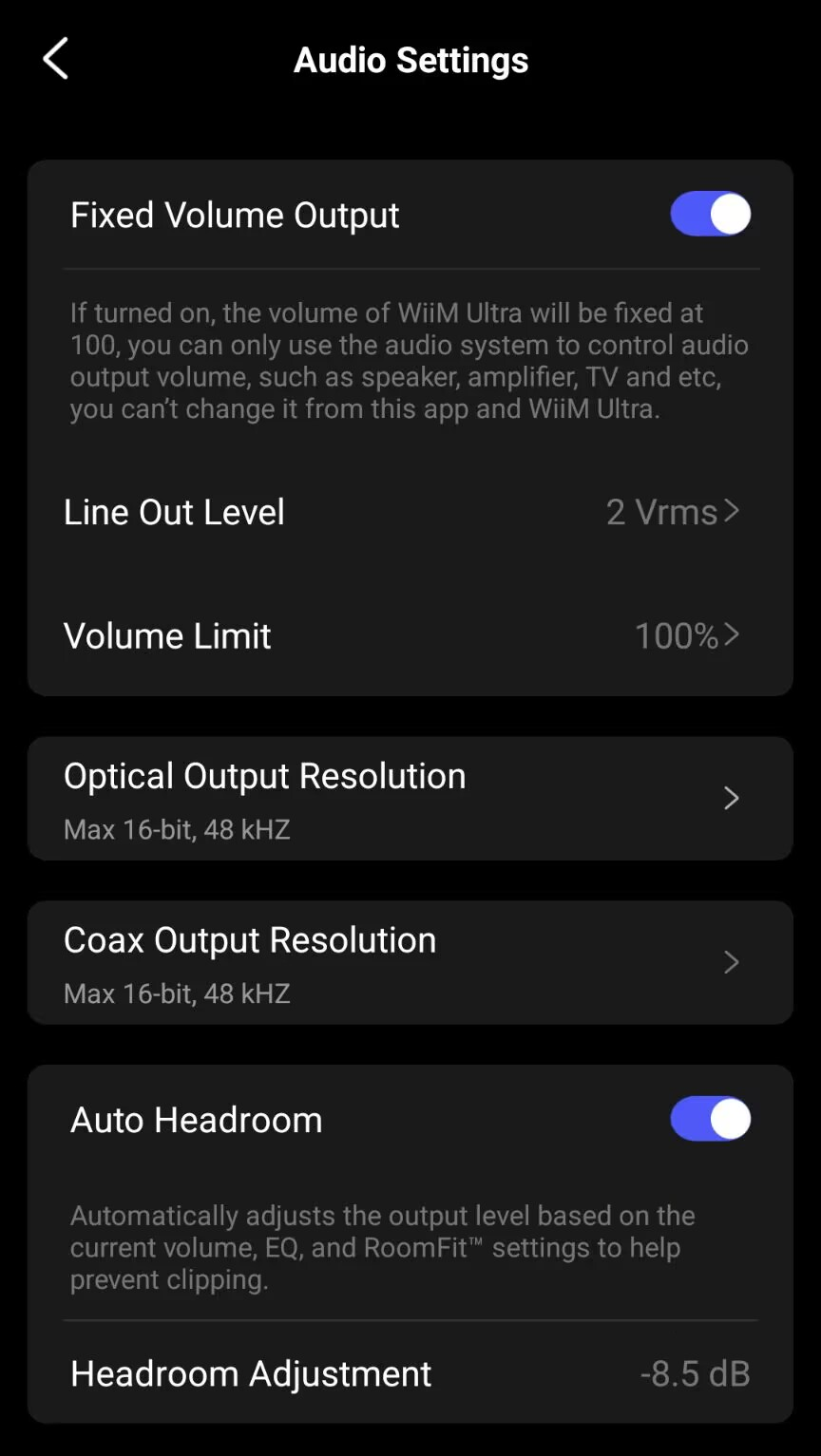
Auto Headroom is enabled by default, but you can disable it in the WiiM Home app.
When enabled, it automatically manages digital headroom based on the device's current volume and its EQ and RoomFit™ settings. If the existing headroom is insufficient, the device automatically lowers its output level to create room for the boosted audio signal.
- Auto Headroom applies to both digital and analog outputs.
- Auto Headroom currently does not account for Pre-Gain to avoid unnecessarily lowering the output level when compensating for a low input signal.
Here is how Auto Headroom adapts to different listening scenarios:
- When volume is low: The device already has enough headroom, so Auto Headroom does not work.
- When volume is high: Headroom is tight. Auto Headroom applies the necessary attenuation to prevent the boosted signal from exceeding the maximum digital level.
- When using "Fixed Volume Output": The device volume remains at 100%, leaving no volume-based headroom for positive gain from EQ or RoomFit™. Auto Headroom automatically applies the required internal attenuation.
- When playing in a multi-room group: If the WiiM Ultra is the group leader, any attenuation applied by Auto Headroom on the WiiM Ultra is also applied to the audio sent to all follower devices in the group.
- When using a subwoofer: If the WiiM Ultra is connected to a subwoofer, any attenuation applied by Auto Headroom on the WiiM Ultra is also applied to the subwoofer output signal.
How to Disable Auto Headroom
- Open the WiiM Home app.
- Go to the Devices tab > Device Settings
 > Audio Settings.
 - Toggle off Auto Headroom.
Tips
- When Auto Headroom is applied, playback may sound quieter even though the displayed device volume has not changed. If you control volume with a downstream amplifier or active speakers, adjust the volume on that equipment to reach your preferred listening level.
- The tonal balance of your EQ or RoomFit™ profile remains unchanged. Auto Headroom only adjusts the overall output level.