
The following WiiM devices support PCM format only (no Dolby Digital or DTS) over Optical In or HDMI ARC:
- WiiM Mini
- WiiM Pro
- WiiM Pro Plus
- WiiM Amp
When connecting a TV to one of these WiiM devices via Optical In or HDMI ARC, the TV's digital audio output must be set to PCM to ensure proper audio playback.
Follow the general instructions outlined in this guide to configure your TV's audio output to PCM.
Note: The exact steps may vary slightly between models, even within the same brand. Use this guide as a reference, and consult your TV's user manual for detailed instructions if necessary.
Samsung
- Open the Settings menu using your remote control.
- Navigate to Sound > Expert Settings > Digital Output Audio Format.
- Select PCM as the output format.
Sony
- Open the Settings menu using your remote control.
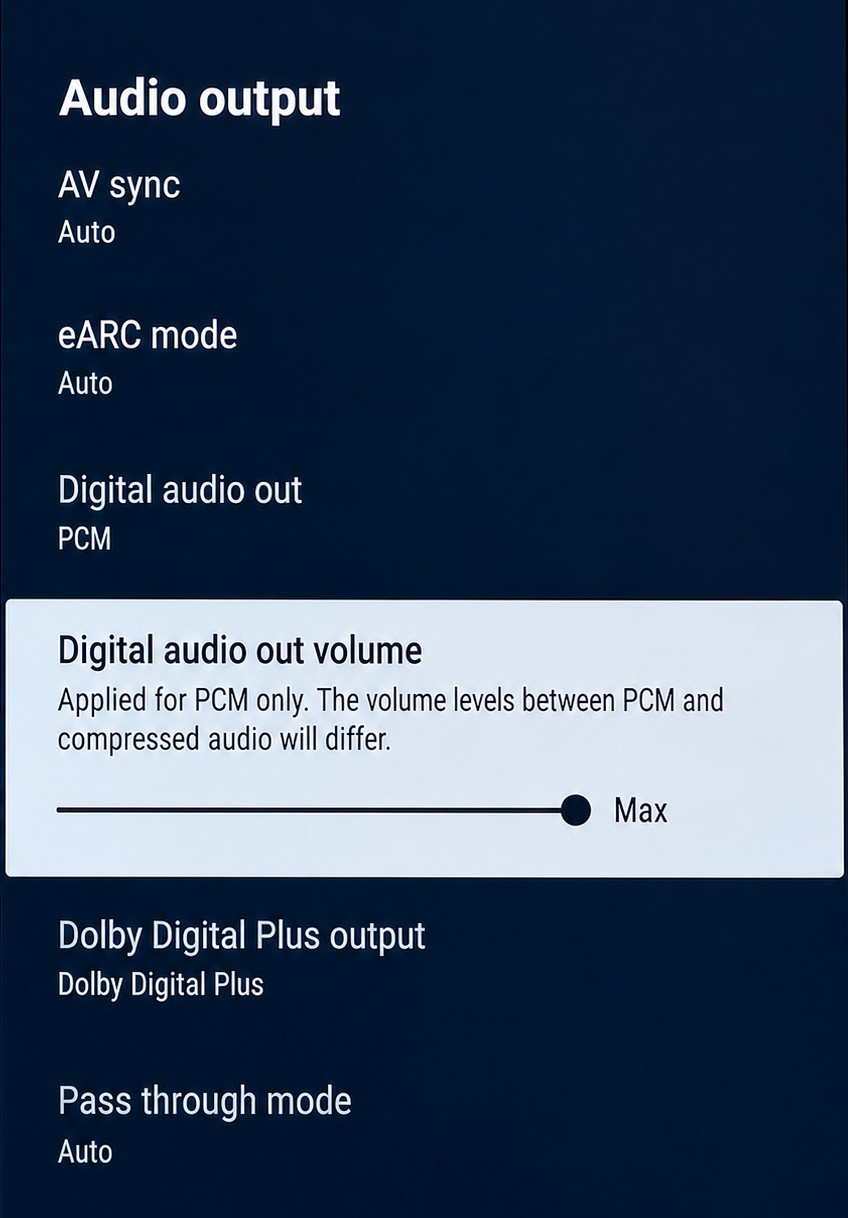
- Navigate to Display & Sound > Audio output > Digital audio out.
- Select PCM as the output format.
Note: Make sure Digital Audio Out Volume is set to Max. Otherwise, the connected WiiM device may output very low or no sound.
LG
- Open the Settings menu using your remote control.
- Navigate to Sound > Sound Out.
- Select either Optical or HDMI ARC depending on your connection.
- Choose Digital Sound Out and select PCM as the output format.
Hisense
- Open the Settings menu using your remote control.
- Navigate to Device Preferences > Sound > Digital Output.
- Select PCM as the output format.
TCL
- Open the Settings menu using your remote control.
- Navigate to Audio > S/PDIF and ARC.
- Select PCM-STEREO as the output format.
Vizio
- Open the Settings menu using your remote control.
- Navigate to Audio > Digital Audio Out.
- Select PCM as the output format.
Sharp
- Open the Settings menu using your remote control.
- Navigate to Sound > Advanced Audio Settings > Digital Audio Out Type.
- Select PCM as the output format.
Apple TV
- Open the Settings menu using your remote control.
- Navigate to Video and Audio > Audio Format.
- Turn on Change Format and then choose Stereo. This ensures the Apple TV outputs audio in PCM format.