The WiiM Ultra is powered by the high-performance ESS ES9038Q2M DAC, delivering exceptional audio clarity and ultra-low distortion.
To further fine-tune the Line Out and Headphone Out audio output, the DAC provides seven digital filter types. Each filter slightly changes how high-frequency content is processed, allowing you to adjust the sound character based on your listening preference.
Seven DAC Digital Filter Types
1. Brick Wall Filter
Key Feature: Extremely sharp cutoff with minimal aliasing.
Benefit: Delivers the most accurate, analytical sound for technical evaluation.
Suitable Audience: Users focused on measurement, mastering, or maximum signal precision.
2. Corrected Minimum Phase Fast Roll-Off Filter Recommended
Key Feature: Fast roll-off with tight transients and reduced pre-ringing.
Benefit: Balances immediacy and precision for a natural, impactful sound.
Suitable Audience: Audiophiles seeking a perfect balance between accuracy and musicality.
3. Apodizing Fast Roll-Off Filter
Key Feature: Fast roll-off that smooths digital harshness.
Benefit: Restores clarity and cleans up artifacts from earlier recording stages.
Suitable Audience: Ideal for listening to bright, low-quality, or compressed digital recordings.
4. Minimum Phase Slow Roll-Off Filter
Key Feature: Gentle high-end roll-off with minimized pre-ringing.
Benefit: Produces a warm, organic, and analog-like tone.
Suitable Audience: Listeners who prefer relaxed, non-fatiguing, long listening sessions.
5. Minimum Phase Fast Roll-Off Filter
Key Feature: Fast roll-off with clear transients.
Benefit: Delivers a punchy, dynamic, and energetic sound signature.
Suitable Audience: Perfect for fans of bass-heavy music, live recordings, and rock.
6. Linear Phase Slow Roll-Off Filter
Key Feature: Slow roll-off maintaining absolute phase linearity.
Benefit: Offers a relaxed sound with smooth trebles and no fatigue.
Suitable Audience: Users seeking a gentle, laid-back presentation for long sessions.
7. Linear Phase Fast Roll-Off FilterDefault Recommended
Key Feature: Accurate and detailed reproduction with flat frequency response.
Benefit: Accurate and detailed reproduction across the entire spectrum.
Suitable Audience: A versatile "all-rounder" suitable for all music genres and high-fidelity listening.
DAC Digital Filter Settings
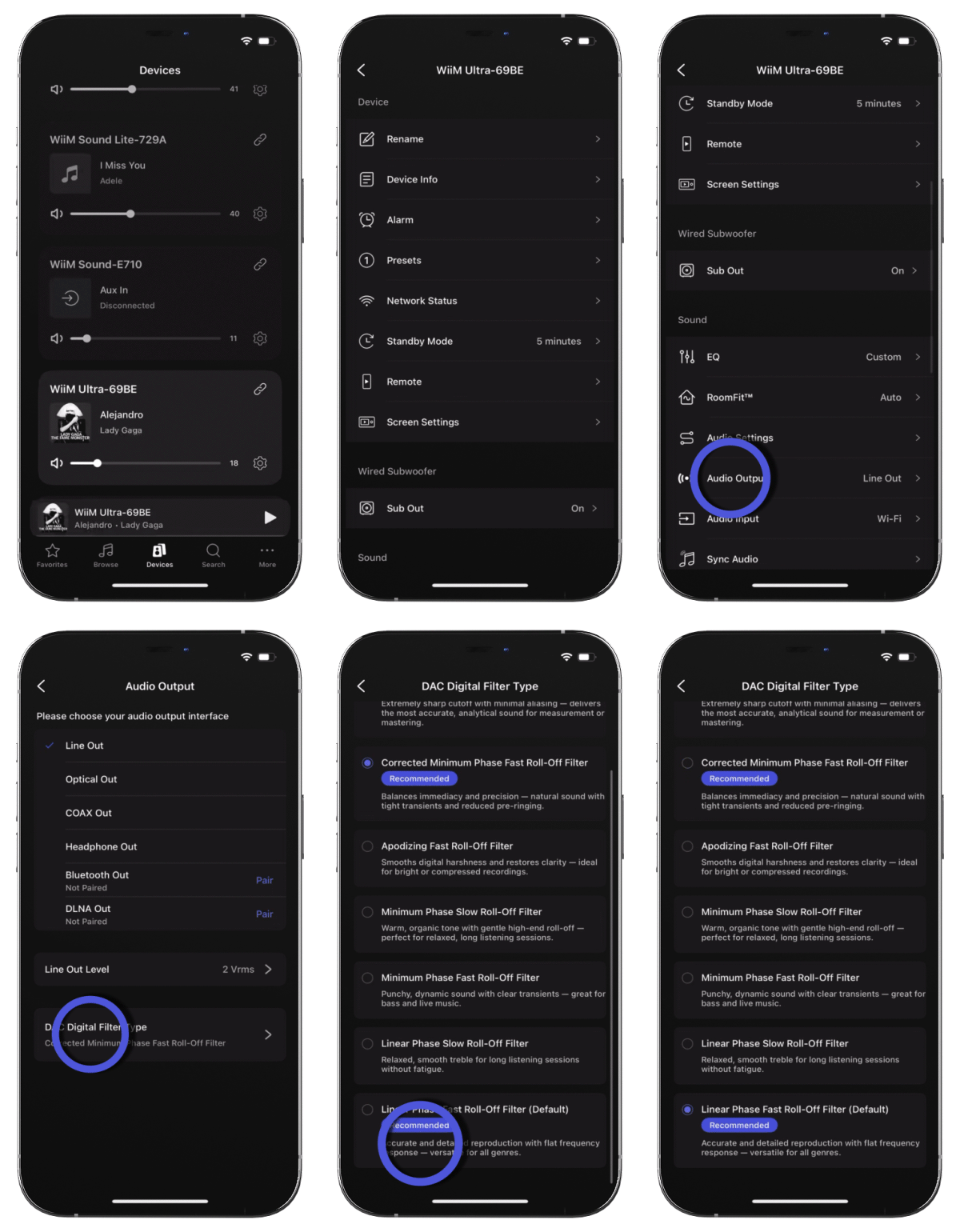 |
Open the WiiM Home app.
- Go to the Devices tab > Device Settings
 > Audio Output. > Audio Output.
- Select Line Out or Headphone Out as the audio output.
- Tap DAC Digital Filter Type at the bottom.
- Select the filter that best matches your listening preference.
|
